Supplies and FAQs
Who is this course for?
This course is designed for anyone who wants to get started with ink and watercolour sketching. Unlike the free courses this course goes much further, much deeper, and you get feedback on all your art from me. We will start with simple ideas and exercises, and before you know it you'll be a competent and confident ink and watercolour artist.
The paid courses are designed to work together, and not overlap. I can't talk about sketching without using a pen - so there is 'overlap' in that sense. But this course is designed to be a starting point from which all the other courses build.
If you’re eager to learn the basics and quickly move beyond them to start experimenting more confidently, this is for you.
Is there a time limit?
There’s no time limit on this course.
Work through the lessons at your own pace, and feel free to revisit any part of the course as often as you like.
What supplies are suggested?
For most of the course, I use beginner friendly supplies - you can check out the video above to see exactly which. This includes Cotman watercolours, fine liners and a simple sketchbook.
In terms of what you should use? Well, a basic waterproof pen, sketchbook and set of colours. Thee are no hard rules here. From time to time, I might switch to a different pen or paper, but this course is not about having the perfect kit. It’s about making the most of what you already have. There’s no need to buy anything new—just bring your current materials and your curiosity.
Common FAQs and where to find answers
👉 View the supplies I use most often
👉 How to log in and find your course dashboard
👉 How to post your photos and get feedback
👉 My photos are too big to post, how do I make them smaller?
What is the quality of the videos?
All videos are available in full HD or 4K quality.
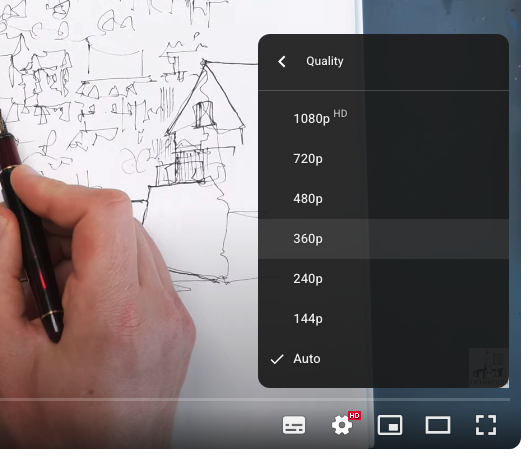
To make sure you're watching in the best resolution, click the ⚙️ settings icon in the bottom-right corner of the video player and select the highest quality available (1080p or 4K).
If the video looks blurry or out of focus, it may be due to a slow internet connection—try adjusting the quality manually using the settings menu.